
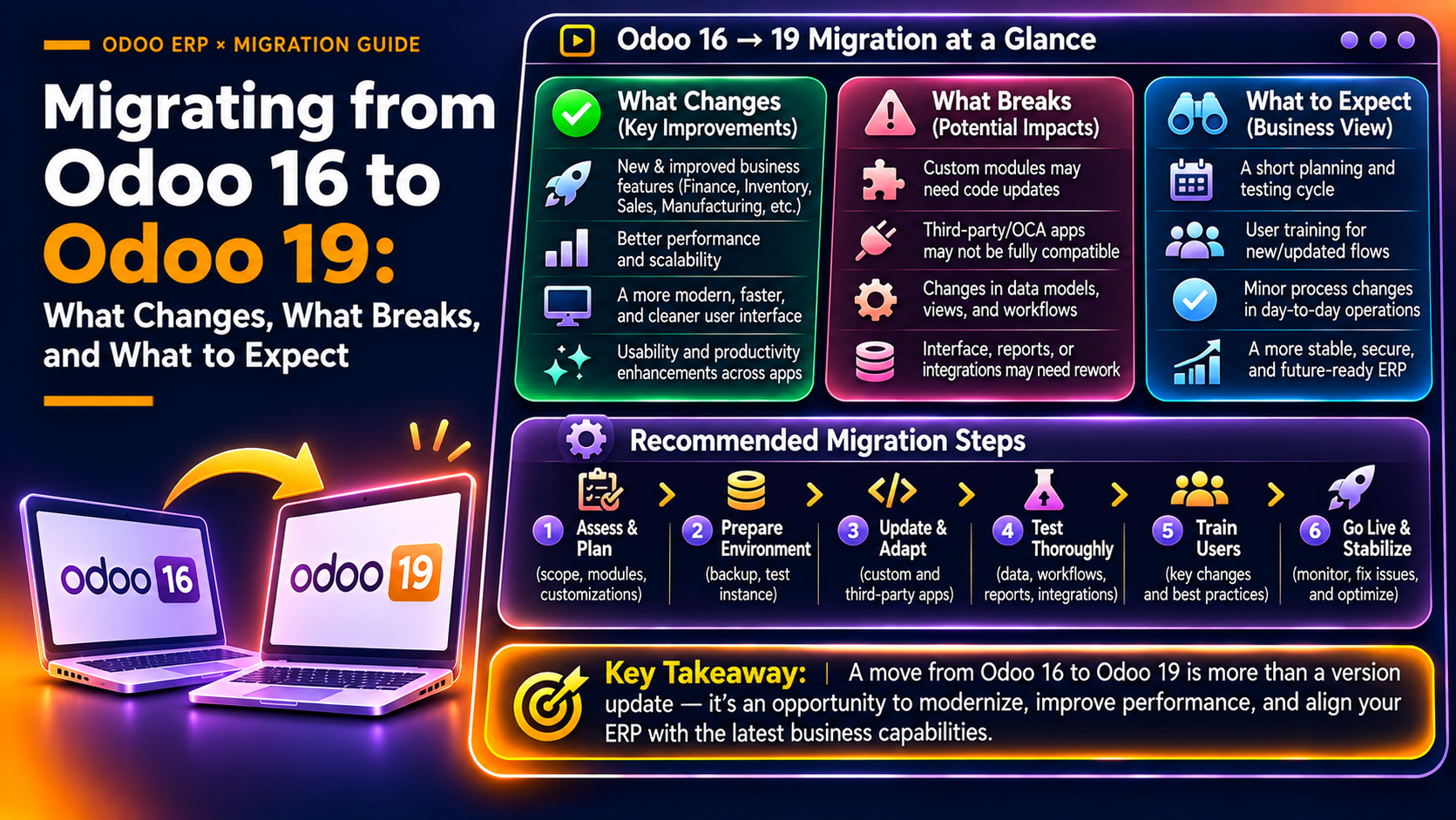
Introduction
Odoo ships one major version a year, typically between September and November, and provides standard support for roughly three years per version before it moves to extended, paid-only support. Odoo 16 shipped in October 2022, which means its standard support window has already closed — a business still running Odoo 16 today isn't choosing whether to migrate, only when, and how far to jump.
Odoo 19 is the version this guide treats as the migration target. It's worth saying upfront: Odoo 20 shipped in September 2026, and a decision made today should weigh whether to land on 19 or go straight to 20 — more on that trade-off at the end of this post.
Why a 16-to-19 Jump Is a Different Project Than a One-Version Upgrade
Going from 16 to 19 means crossing three major releases (17, 18, 19) in one migration, even if you never run 17 or 18 directly. That matters because breaking changes accumulate across versions, not just in the one you land on. A custom module or integration built against Odoo 16's structure may need rework for changes introduced in 17, again for 18, and again for 19 — even though you're only testing the final result once. This is the main reason a multi-version jump is scoped and budgeted differently from a routine single-version upgrade.
What Changes Between 16 and 19, at a Business Level
Without getting into framework or database internals, here's what's different enough to notice in day-to-day use across the core apps:
Business-level summary, not a technical changelog. Framework, ORM, and API-level changes exist underneath these but are deliberately left out here — verify specifics with your implementation partner before planning custom module work.
What Typically Breaks in a Multi-Version Jump Like This
- ✓Custom modules and customizations. Anything built against Odoo 16's structure — custom fields, workflow tweaks, report templates — is the single biggest source of migration effort. The more custom development accumulated on Odoo 16, the more rework this jump requires, consistent with the general over-customization cost pattern covered elsewhere on this blog.
- ✓Third-party apps and integrations. Any app from the Odoo marketplace or a custom-built integration needs its own compatible version for 19. Some older or less-maintained apps may not have one yet, which can force a workaround or a replacement.
- ✓Server and hosting requirements. Odoo 19 requires newer minimum PostgreSQL and Python versions than Odoo 16 supported. Self-hosted deployments should confirm their infrastructure can meet the new baseline before migration, not after.
- ✓Country-specific localization modules. Tax and compliance modules for your specific country sometimes lag the core release by weeks or months. Confirm your localization is available and stable for 19 before committing to a cutover date.
Direct Jump vs. Stepping Through 17 and 18
Odoo officially supports skipping versions in a single migration — you don't have to pass through 17 and 18 as separate live deployments. Whether that's the right approach depends mostly on how much custom development exists on your Odoo 16 instance. A light footprint (a handful of standard apps, minimal customization) is usually a reasonable candidate for a direct jump. A heavily customized instance with many custom modules often benefits from a staged approach — migrating to an intermediate version first to isolate and test breaking changes in smaller batches, rather than debugging three versions' worth of changes at once.
Should You Land on Odoo 19, or Go Straight to Odoo 20?
This is worth deciding deliberately rather than defaulting to “the version this guide is about.” Odoo 19 is a settled release with roughly a year of real-world use, patches, and mature third-party app support behind it as of now. Odoo 20, released in September 2026, is new enough that localization modules and some third-party apps may still be catching up, and the first months of any major release typically carry more undiscovered edge cases. If your business values a well-tested landing spot over having the newest features immediately, 19 is a reasonable, deliberate choice — not a compromise. If you want the longest support runway and the newest capability and can tolerate some early-release risk, weigh 20 instead. This exact trade-off is covered in more depth in a dedicated post on this blog about whether it's the right time to migrate to Odoo 20.
Ready to Try It?
Not sure whether your Odoo 16 setup should land on 19 or 20? Book a Free Demo at hirebeans.cloud and we'll help you scope it.
Book a Free Demo